Organization settings
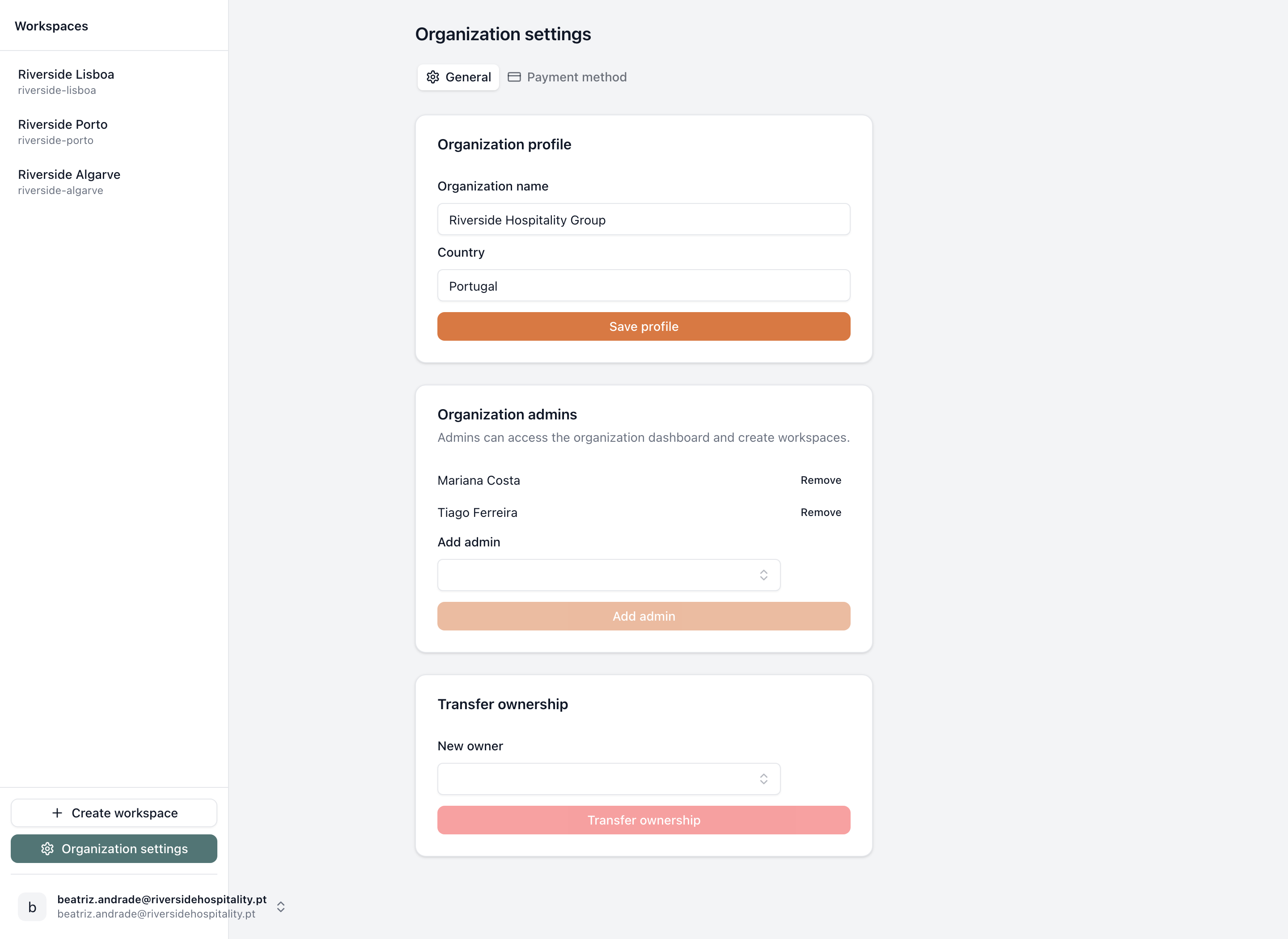
The General tab of organization settings — profile, admins, and ownership transfer.
Open Organization settings from the workspace sidebar. The link only appears there for the organization's owner and its admins — see What an organization is for what separates those two roles.
The page is titled "Organization settings" and has two tabs: General (this page) and Payment method, covered in Balance and plans.
General tab
- 1
- 2
- 3
- Organization profile — name and country, editable by the owner
- Organization admins — visible and editable by the owner only
- Transfer ownership — visible and usable by the owner only
Organization profile. "Organization name" and "Country" text fields, plus a "Save profile" button. Both the owner and admins can see this card, but only the owner can change the organization's name and country. If you're an admin and need either corrected, ask the owner to do it.
Admins and transfer ownership are owner-only
The Organization admins and Transfer ownership cards below only appear for the organization's owner. If you're an admin, you will not see them on this page at all — that's expected, not a bug.
Organization admins (owner only). Lists the current admins by name, each with a Remove button, an Add admin picker, and an Add admin button. The card's own description explains what the role grants: "Admins can access the organization dashboard and create workspaces." Admins can also manage billing — see Balance and plans.
Transfer ownership (owner only). A New owner picker plus a Transfer ownership button. Transferring only changes who holds the organization-level owner role — it doesn't touch anyone's workspace membership, so the previous owner keeps whatever workspace access they already had. What they lose is the owner-only organization capabilities (the admins card and this one), unless they're also added as an admin.
When the organization is locked
If the organization's prepaid balance has run out and the grace period has ended, this page is replaced by a full-page "Workspace is read-only" block instead of the tabs and cards above. The Payment method tab stays reachable throughout, so an owner or admin can top up and restore access — see Balance and plans for the complete lock sequence.